
Robots.txt is the smallest file on your site with the biggest potential to break it. A single misplaced slash can deindex an entire domain. A missing line can hand your training data to every AI crawler on the internet. This guide walks through the modern spec (RFC 9309), the 2026 AI crawler landscape, and the rules that actually move the needle, without the filler that pads most SEO posts.
What Is robots.txt?
Robots.txt is a plain-text file that lives at the root of your domain, always at /robots.txt. It tells well-behaved web crawlers which parts of your site they may fetch and which they should leave alone. Nothing more.
The protocol was informal for decades until the IETF standardized it in September 2022 as RFC 9309. Google, Bing, Yandex, OpenAI, Anthropic, Apple, and Perplexity all advertise compliance. Compliance is voluntary, though. Robots.txt is a request, not a firewall.
Two things robots.txt does not do:
- It does not control indexing. A page you block from crawling can still appear in search results if other sites link to it (Google will show the URL with no snippet).
- It does not provide security. Anyone, including malicious scrapers, can read your robots.txt. Listing
/admin/there just tells attackers where to look.
If you want to skip the syntax and ship something correct in two minutes, our Robots.txt Generator handles the boilerplate, AI crawler presets, and Cloudflare Content-Signal header in one click.
How Search Engines Use It
When a crawler first visits your site, it fetches /robots.txt before anything else. Per RFC 9309 the file must be:
- Served over the same protocol and host as your site
- Returned with
Content-Type: text/plainand UTF-8 encoding - No larger than 500 KiB when parsed (anything beyond that limit is ignored)
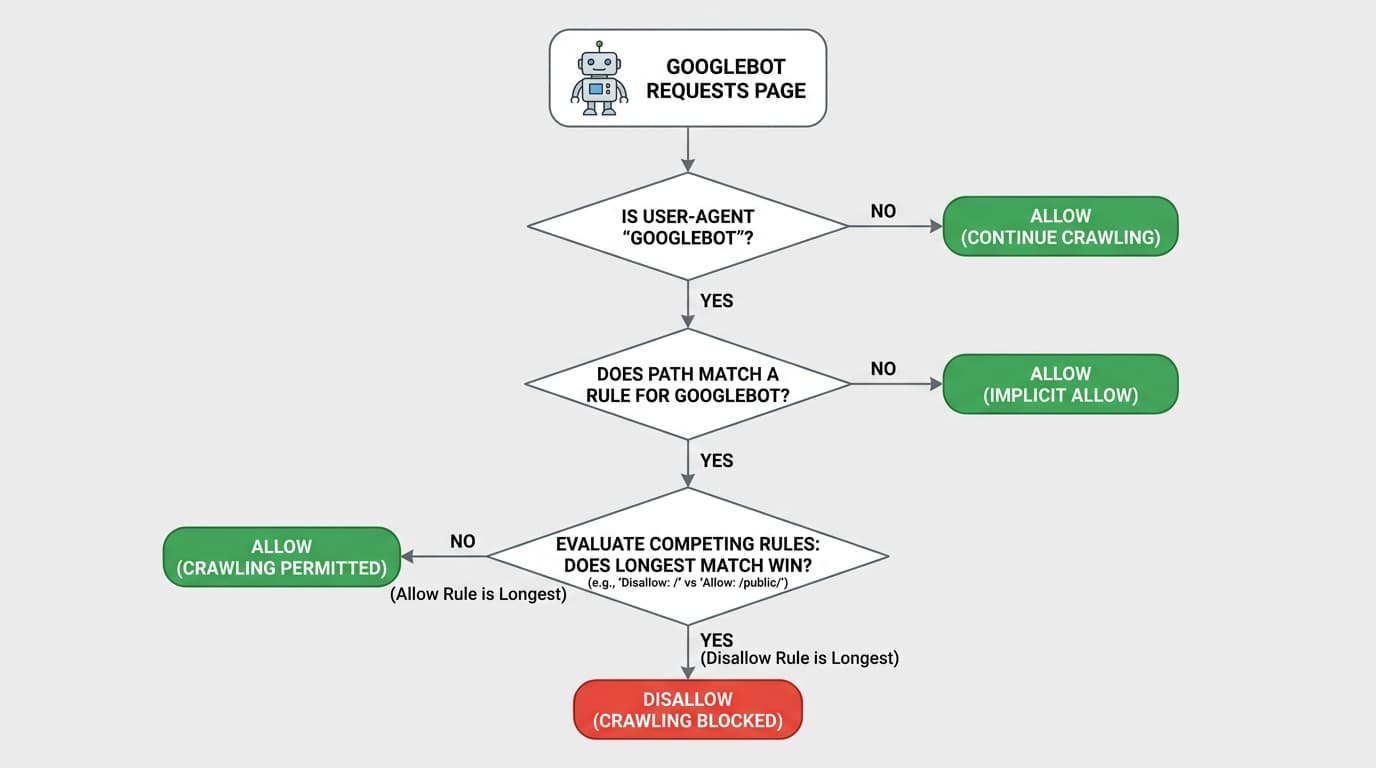
The crawler then looks for the most specific User-agent group that matches its name. User-agent matching is case-insensitive (Googlebot equals googlebot), but path matching is case-sensitive (/Page is not the same as /page). This trips up teams running mixed-case URL schemes on Windows-origin servers.
Within a matching group, the crawler applies the longest-match-wins rule from RFC 9309 section 2.2.2. The rule with the most octets matching the requested URL prevails. When two rules tie in length, Allow beats Disallow. So:
User-agent: *
Disallow: /reports/
Allow: /reports/public/
A request for /reports/public/q4.pdf is allowed (longer match) even though /reports/ is disallowed.
If your server returns 4xx for /robots.txt, Google treats the site as fully crawlable. A persistent 5xx (for more than 30 days) is also treated as fully crawlable, but in the short term Google pauses crawling. Always serve a valid file, even if it is just User-agent: * and a sitemap line.
Allow vs Disallow Rules
Every robots.txt is a series of groups. Each group starts with one or more User-agent lines and ends with Allow, Disallow, and (optionally) Sitemap directives.
Wildcards expand your options:
*matches zero or more of any character$anchors the match to the end of the URL
Three patterns cover most needs:
# Block a single file
User-agent: *
Disallow: /internal-memo.pdf

# Block an entire directory
User-agent: *
Disallow: /staging/

# Block a directory but allow one file inside it
User-agent: *
Disallow: /reports/
Allow: /reports/quarterly-summary.html
Sitemap is a top-level directive, not tied to any group. You can list multiple sitemaps, each on its own line, with absolute URLs:
Sitemap: https://example.com/sitemap.xml
Sitemap: https://example.com/sitemap-news.xmlCommon Examples
The five patterns below cover roughly 90 percent of real-world robots.txt files.
Allow everything (the default if you have no file):
User-agent: *
Disallow:
Block everything (use only on staging, never production):
User-agent: *
Disallow: /
Block one bot, allow the rest:
User-agent: SemrushBot
Disallow: /

User-agent: *
Disallow:
Block search results and faceted-nav noise:
User-agent: *
Disallow: /search
Disallow: /*?sort=
Disallow: /*?filter=
A real production example. Stripe runs one of the cleanest robots.txt files on the web:
User-agent: ia_archiver
Disallow: /

User-agent: *
Allow: /docs
Disallow: /handoff
Disallow: /sources/test_*

User-agent: rogerbot
Disallow: /

Sitemap: https://stripe.com/sitemap.xml
Three groups, one sitemap, no over-engineering. Notice the explicit Allow: /docs even though nothing above it disallows /docs. That is defensive clarity, useful when the file grows.
Generate your robots.txt
Robots.txt Generator
One-click presets for every major search and AI crawler, a Cloudflare Content-Signal toggle, and a validator that flags syntax errors before you ship.
WordPress Setup
WordPress generates a virtual robots.txt by default that is usually fine. Most “WordPress SEO booster” rule sets you find online actively hurt rankings. The minimal, Yoast-endorsed version is:
User-agent: *
Disallow: /wp-admin/
Allow: /wp-admin/admin-ajax.php

Sitemap: https://example.com/sitemap_index.xml
That is it. Do not block:
/wp-includes/(contains scripts Google needs to render pages)/wp-content/plugins/(same reason)- CSS or JS files anywhere
/?p=,/tag/,/category/,/author/(Google explicitly warns against this)
Ecommerce Best Practices
Ecommerce sites have one job for robots.txt: keep crawlers focused on revenue pages, away from infinite parameter combinations and private user flows.
User-agent: *
Disallow: /cart
Disallow: /checkout
Disallow: /account
Disallow: /wishlist
Disallow: /search
Disallow: /*?sort=
Disallow: /*?filter=
Disallow: /*?color=
Disallow: /*?utm_

User-agent: AdsBot-Google
Allow: /

Sitemap: https://example.com/sitemap.xml
Sitemap: https://example.com/sitemap-products.xml
The dedicated AdsBot-Google group matters: Google Ads will refuse to serve shopping ads for products it cannot crawl, and AdsBot-Google does notobey the wildcard group. Always allow it explicitly. Shopify's production robots.txt does exactly this for AdIdxBot, Pinterestbot, and AdsBot-Google while blocking /cart, /checkout, /account, and a long list of campaign-parameter URLs.
Blocking AI Crawlers (2026)
This is where most older guides fall apart. The 2026 model is block training, allow retrieval: stop AI vendors from using your content to train their next foundation model, but keep your site visible inside ChatGPT, Claude, Gemini, and Perplexity answers (because those answers cite sources, and citations send traffic).
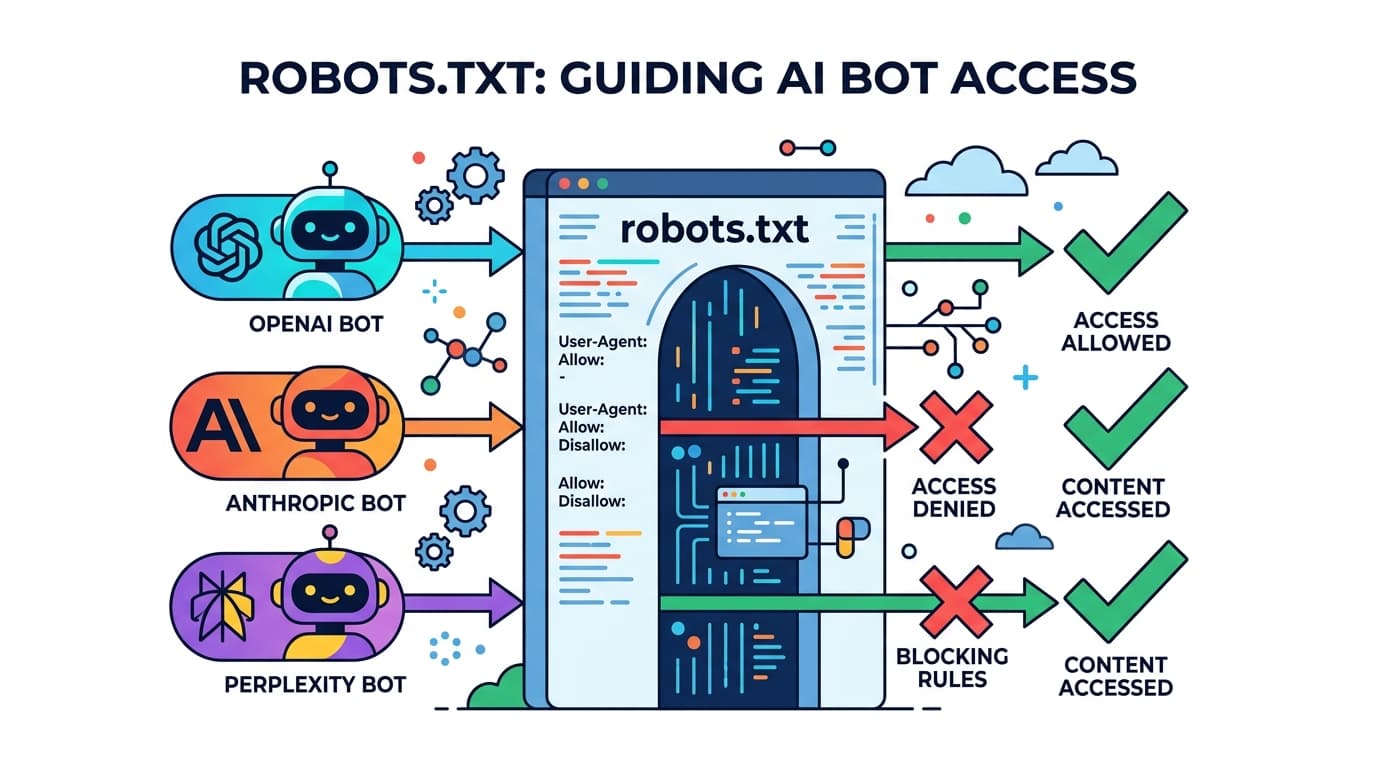
The user-agents you need to know:
| Operator | Training crawler (often blocked) | Retrieval / search bot (usually allowed) |
|---|---|---|
| OpenAI | GPTBot | OAI-SearchBot, ChatGPT-User |
| Anthropic | ClaudeBot, anthropic-ai, claude-web (legacy) | Claude-User, Claude-SearchBot |
| Google (Gemini/Vertex) | Google-Extended (a token, not a bot) | Googlebot (unaffected) |
| Apple | Applebot-Extended | Applebot |
| Meta | Meta-ExternalAgent, FacebookBot | - |
| Perplexity | - | PerplexityBot, Perplexity-User |
| ByteDance | Bytespider | - |
| Common Crawl | CCBot | - |
| Cohere | cohere-ai | - |
| Amazon | Amazonbot | - |
The Anthropic three-bot split
Anthropic, in particular, deserves attention because it ships three distinct user-agents and the difference matters:
ClaudeBotcrawls the open web to gather training data. Block it if you do not want your content in future Claude models.Claude-Userfetches a page on demand when a user asks Claude a question that requires live web access. This is interactive, not training. Most publishers allow it.Claude-SearchBotpowers Claude's search-result citations. Allowing it is what gets you cited in Claude answers.
A blanket Disallow: / for anthropic-ai blocks all three and removes you from Claude entirely. The granular pattern most publishers want is:
User-agent: ClaudeBot
Disallow: /

User-agent: Claude-User
Allow: /

User-agent: Claude-SearchBot
Allow: /
The same logic applies to OpenAI: block GPTBot, allow OAI-SearchBot and ChatGPT-User. Apply this framework consistently across every vendor.
Cloudflare Content-Signal header
In September 2025, Cloudflare proposed a machine-readable extension called the Content Signals Policy. It adds a single line to robots.txt with three keys:
Content-Signal: search=yes, ai-input=yes, ai-train=noThe three signals mean:
search- appearing in traditional search engine resultsai-input- being used as live context in an AI answer (with citation)ai-train- being included in training datasets for foundation models
Values are yes or no; omitting a signal means neutral. Cloudflare's managed robots.txt customers default to search=yes, ai-train=no. Google, OpenAI, and Anthropic have all publicly acknowledged the header. Adoption is still early and the signal is advisory, not enforced. Pair it with WAF rules if you need teeth.
A complete 2026-ready robots.txt for a publisher who wants AI citations but no training:
# Allow everyone by default
User-agent: *
Allow: /
Disallow: /admin/

# Block training-only AI crawlers
User-agent: GPTBot
Disallow: /

User-agent: ClaudeBot
Disallow: /

User-agent: Google-Extended
Disallow: /

User-agent: CCBot
Disallow: /

User-agent: Bytespider
Disallow: /

# Allow retrieval/search bots explicitly
User-agent: OAI-SearchBot
Allow: /

User-agent: Claude-SearchBot
Allow: /

User-agent: PerplexityBot
Allow: /

# Machine-readable policy
Content-Signal: search=yes, ai-input=yes, ai-train=no

Sitemap: https://example.com/sitemap.xml
Mistakes That Hurt SEO
Six errors come up over and over in real audits.
- Blocking CSS or JS. Google needs them to render the page. Blocking them kills mobile usability scores.
- Pushing a staging
Disallow: /to production. Set up a deploy hook that overwrites robots.txt based on environment. - Blocking
/sitemap.xml. Yes, people do this. The sitemap belongs in robots.txt as a directive, not in a disallow. - Using
Noindex:in robots.txt. Google deprecated theNoindex:directive on 1 September 2019. It is silently ignored today. Use a<meta name="robots" content="noindex">tag or theX-Robots-TagHTTP header instead. - Case-sensitivity slip-ups.
Disallow: /Admindoes not block/admin. Pick one casing and stick to it. - Trailing-slash confusion.
Disallow: /reportsblocks both/reportsand/reports/and/reports.pdf.Disallow: /reports/only blocks paths inside that directory. Use$if you mean “exact match only.”
robots.txt vs noindex
This is the single most misunderstood point in technical SEO.
- Robots.txt controls crawling. It tells bots not to fetch a URL.
noindexcontrols indexing. It tells Google not to show the page in search results.
The trap: if you Disallow a URL, Google never fetches it, which means Google never sees a noindextag on that page. If anyone links to that URL externally, Google may still index it (URL only, no snippet, no title). You will see it in Search Console as “Indexed, though blocked by robots.txt.”
To truly remove a page from the index, do the opposite of what feels natural: leave it crawlable and add a noindex meta tag or X-Robots-Tag: noindex header. Once Google has reprocessed it and dropped it from the index, you can then add the Disallow rule.
Generate robots.txt Online
Once you understand the rules, maintaining robots.txt is mostly a copy-paste exercise. That is what our tool exists to remove. The iToolVerse Robots.txt Generator gives you:
- One-click presets for every major search and AI crawler (including the Anthropic three-bot split)
- A Cloudflare Content-Signal toggle with
search,ai-input, andai-trainkeys - Sitemap and host directive fields
- Instant copy, download, and a validator that flags syntax errors before you ship
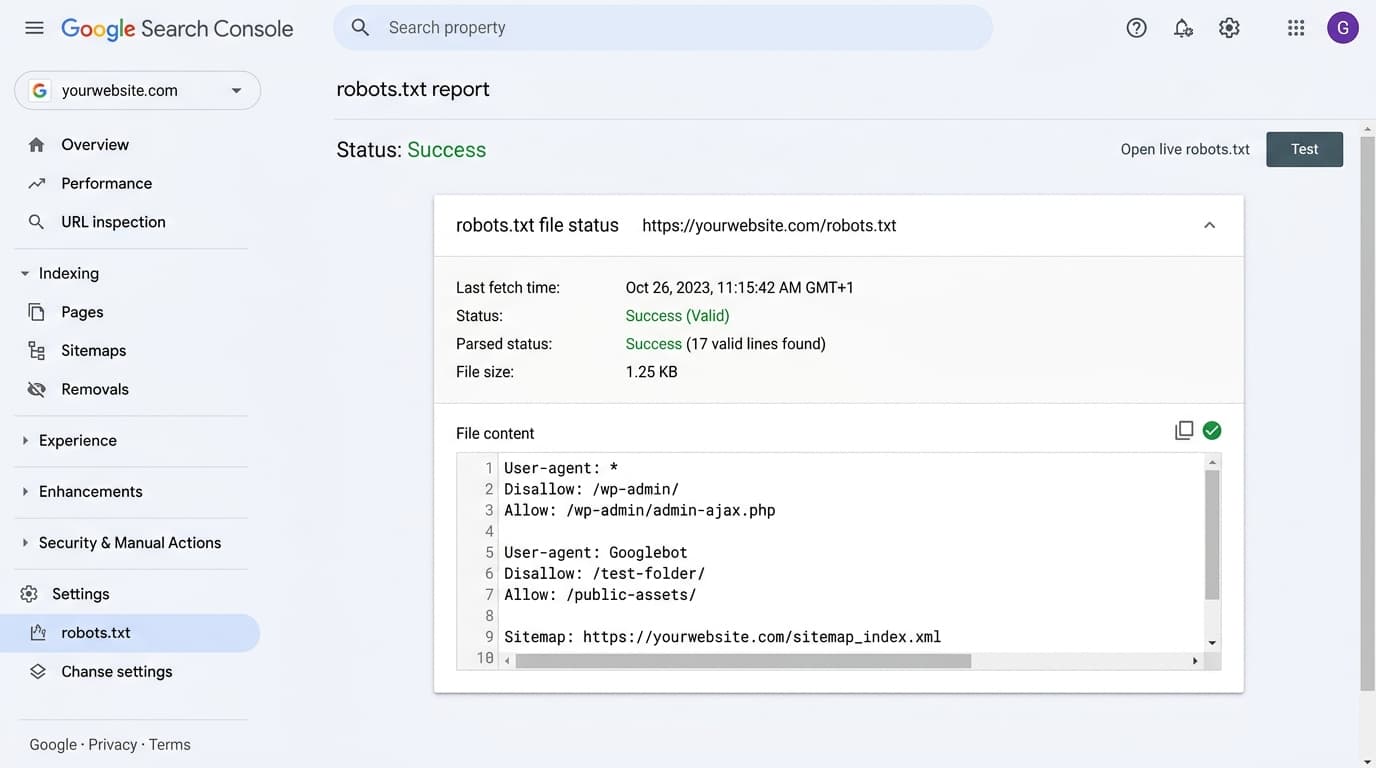
After you upload the file, validate it inside Google Search Console under Settings → robots.txt. The report shows the last-fetch time, parse status, file size, and lets you test any URL against the live rules. It is the fastest sanity check available, and it surfaces problems the moment Google notices them.
Ship a correct robots.txt in two minutes
Robots.txt Generator
AI crawler presets, Cloudflare Content-Signal toggle, and a live validator - everything in one free tool.