
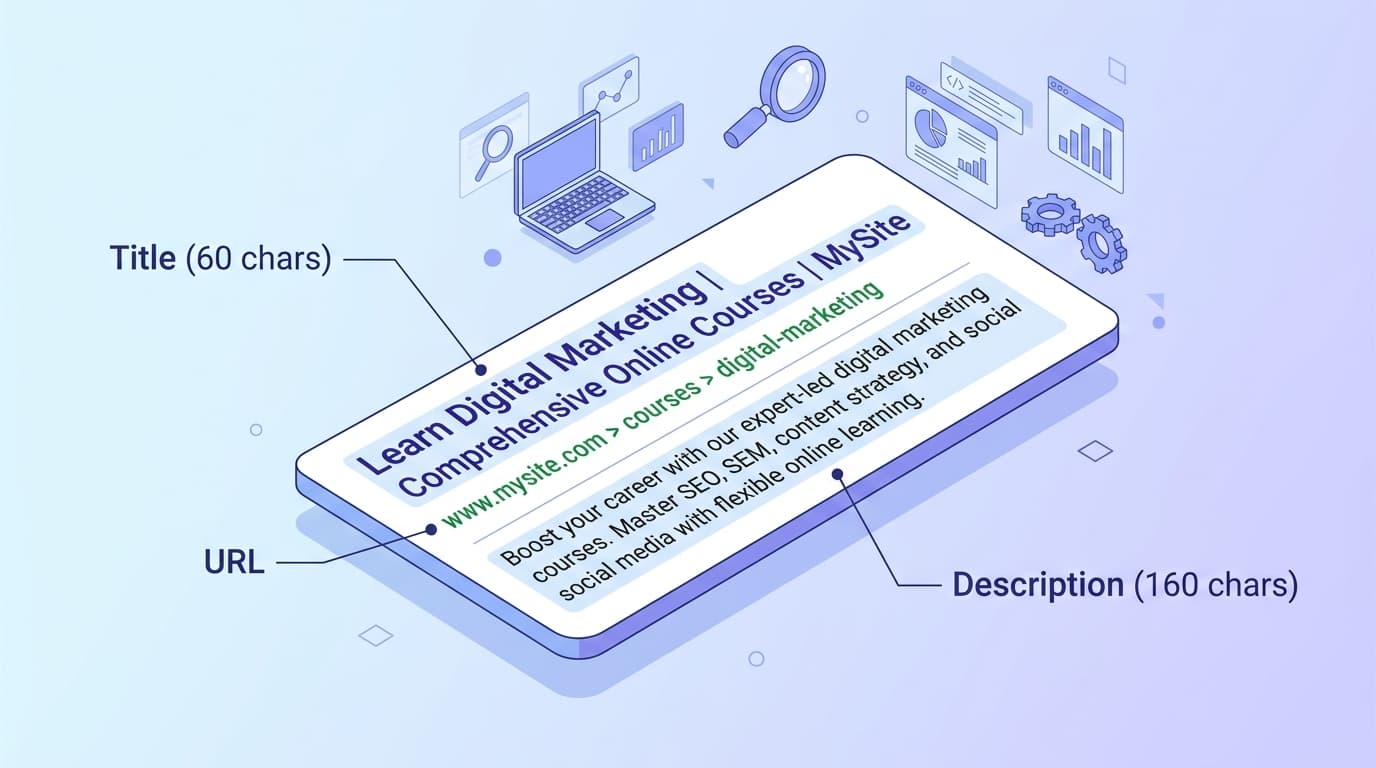
Meta tags are the smallest piece of HTML with the biggest impact on whether anyone actually clicks your search result. They do not directly move rankings, but they decide how your page looks in Google, LinkedIn, Slack, X, iMessage, and the new AI Overviews citation cards. Get them right and you compound every other SEO effort. Get them wrong and Google quietly rewrites them for you, usually worse than you would have written them yourself.
This guide covers every meta tag that matters in 2026: title, description, Open Graph, and X (Twitter) Cards. You will get current character limits, copy-paste code blocks, the myths to stop repeating, and the common mistakes that suppress your CTR. We will show you the format first, then you can generate all four blocks in one click with the Meta Tag Generator.
What are meta tags?
Meta tags are snippets of HTML placed inside the <head> of a page. They are invisible to readers but visible to search engines and social platforms, which use them to decide how to display your page in a search result, a share card, or an AI citation.
A minimal modern <head> looks like this:
<head>
  <title>How to Write Meta Tags for SEO in 2026 | iToolVerse</title>
  <meta name="description" content="Learn how to write meta titles, descriptions, Open Graph, and X Card tags that lift CTR. Includes 2026 character limits and a free generator.">
  <link rel="canonical" href="https://www.itoolverse.com/guides/meta-tags-seo-guide">

  <!-- Open Graph -->
  <meta property="og:title" content="How to Write Meta Tags for SEO in 2026">
  <meta property="og:description" content="2026 character limits, code blocks, and a free generator for titles, descriptions, OG, and X Cards.">
  <meta property="og:image" content="https://img.itoolverse.com/share/iToolVerse-banner.jpeg">
  <meta property="og:url" content="https://www.itoolverse.com/guides/meta-tags-seo-guide">
  <meta property="og:type" content="article">

  <!-- X (Twitter) Card -->
  <meta name="twitter:card" content="summary_large_image">
  <meta name="twitter:title" content="How to Write Meta Tags for SEO in 2026">
  <meta name="twitter:description" content="Character limits, code blocks, and a free generator.">
  <meta name="twitter:image" content="https://img.itoolverse.com/share/iToolVerse-banner.jpeg">
</head>
The four groups above (title, description, Open Graph, X Card) are the entire job. The meta keywords tag has been dead since Google dropped it in 2009; do not bother.
Why meta tags still matter (even for AI Overviews)
Meta description is not a ranking factor. John Mueller from Google has repeated this many times, and in 2024 he called the fixed character counts that get quoted everywhere “all made up.” So why care?
- CTR. Backlinko's analysis of 4 million search results found pages with a meta description get 5.8 percent more clicks than pages without. Emotional language in descriptions can lift CTR up to 13.9 percent. With #1 organic averaging 27.6 percent CTR and #10 averaging 2.4 percent, every fractional CTR gain is real traffic.
- Title is a soft ranking signal.Google uses the title to understand topical relevance, even though the keyword on its own does not “rank” you.
- Social share visuals. Open Graph and X Card tags decide whether your link in a Slack message, a LinkedIn post, or an X reply renders as a rich card or a sad blue URL.
- AI Overviews citations.Google's AI Overviews (renamed from SGE in May 2024) often pull your meta description text directly into the citation snippet shown next to your link. A clear, self-contained description is now a GEO asset, not just an SEO one.
Ideal meta title length
The technical answer: Google measures title display in pixels, not characters, and gives no fixed limit. The practical answer used by every SEO tool: aim for 50 to 60 characters or roughly 600 pixels for desktop.
Rules of thumb for 2026:
- Front-load your primary keyword in the first 30 characters.
- Put the brand at the end, separated by a pipe or dash:
Primary Keyword - Secondary Modifier | Brand. - Write one title per URL. Duplicate titles across a site are a real ranking and CTR drag.
- Match search intent. A “best X” query expects a listicle title, not a product page title.
Ideal meta description length
Target 150 to 160 characters for desktop and around 120 characters for mobile, with the most important phrase in the first 120 characters so nothing critical gets truncated on a phone. Ahrefs measures the actual cutoff at roughly 920 pixels on desktop and 680 pixels on mobile.
Two myths to bury:
- “You get 300 characters now.” No. The temporary 2017 experiment that allowed longer snippets was rolled back in 2018. The 150 to 160 character window has held for seven years.
- “Meta description is a ranking factor.” It is not. Quoting Mueller directly: there is no fixed character count and no direct ranking weight. The value is entirely CTR and AI Overviews citation.
Also expect Google to rewrite your description. Ahrefs found Google only shows the author-written description about 37 percent of the time, and in 2026 it is openly testing Gemini-generated snippets. The fix is not to stop writing them, it is to write them so well that Google has no excuse to rewrite. That means: matching the exact query phrasing where possible, including a verb that hints at action, and ending with a soft promise (a number, a guarantee, a benefit).
Open Graph tags
Open Graph is the Facebook-originated spec (ogp.me) now used by LinkedIn, Slack, Discord, iMessage, WhatsApp, and most non-X platforms when they unfurl a link.
Four tags are required by the spec: og:title, og:type, og:image, and og:url. og:description and og:image:alt are strongly recommended.
<meta property="og:title" content="How to Write Meta Tags for SEO in 2026">
<meta property="og:type" content="article">
<meta property="og:url" content="https://www.itoolverse.com/guides/meta-tags-seo-guide">
<meta property="og:image" content="https://img.itoolverse.com/share/iToolVerse-banner.jpeg">
<meta property="og:image:width" content="1200">
<meta property="og:image:height" content="630">
<meta property="og:image:alt" content="Annotated Google SERP result with title and description labeled.">
<meta property="og:description" content="2026 limits, code blocks, and a free generator for titles, descriptions, OG, and X Cards.">
<meta property="og:site_name" content="iToolVerse">Skip the typing
Meta Tag Generator
Paste your URL and get OG, X Card, and canonical tags in one block - with live Facebook, Twitter, and LinkedIn previews.

X (Twitter) Card tags
X (formerly Twitter) Cards use their own twitter:* namespace. The good news: if you omit a twitter:* tag, X falls back to the matching og:* tag. The minimum viable set is just twitter:card. Everything else can inherit from Open Graph.
<meta name="twitter:card" content="summary_large_image">
<meta name="twitter:site" content="@itoolverse">
<meta name="twitter:creator" content="@itoolverse">
<meta name="twitter:title" content="How to Write Meta Tags for SEO in 2026">
<meta name="twitter:description" content="Character limits, code blocks, and a free generator.">
<meta name="twitter:image" content="https://img.itoolverse.com/share/iToolVerse-banner.jpeg">
Use summary_large_image (1200 × 675 pixels, roughly 2:1) for almost every article and product page. The plain summary card with a tiny square thumbnail looks dated.
Common mistakes that kill your CTR
- Duplicate descriptions across the site. Often caused by a single template default. Each URL needs its own.
- Missing
og:imageor a broken image URL. Your link unfurls as a text-only blob. Instant credibility loss. - Wrong canonical pointing to the homepage. Common with new tool pages. Causes the actual page to drop from the index.
- Keyword stuffing the title.
Buy Shoes, Cheap Shoes, Online Shoes, Discount Shoes - ShoeStoregets rewritten by Google and looks spammy to humans. - Calling meta description a ranking factor in your content brief.It is not. Brief writers should aim for CTR and clarity, not “keyword density.”
- Using
next/scriptor other deferred loaders for JSON-LD or critical meta tags. Anything in the<head>must be in the initial HTML for crawlers that do not run JavaScript. - Trusting the dead Twitter Card Validator. Update your bookmarks.
Before / after rewrites
SaaS pricing page
E-commerce product page
Blog post
In every case, the after version adds a number, a specific benefit, and an intent-matching keyword in the first 30 characters.
Generate all your meta tags in one click
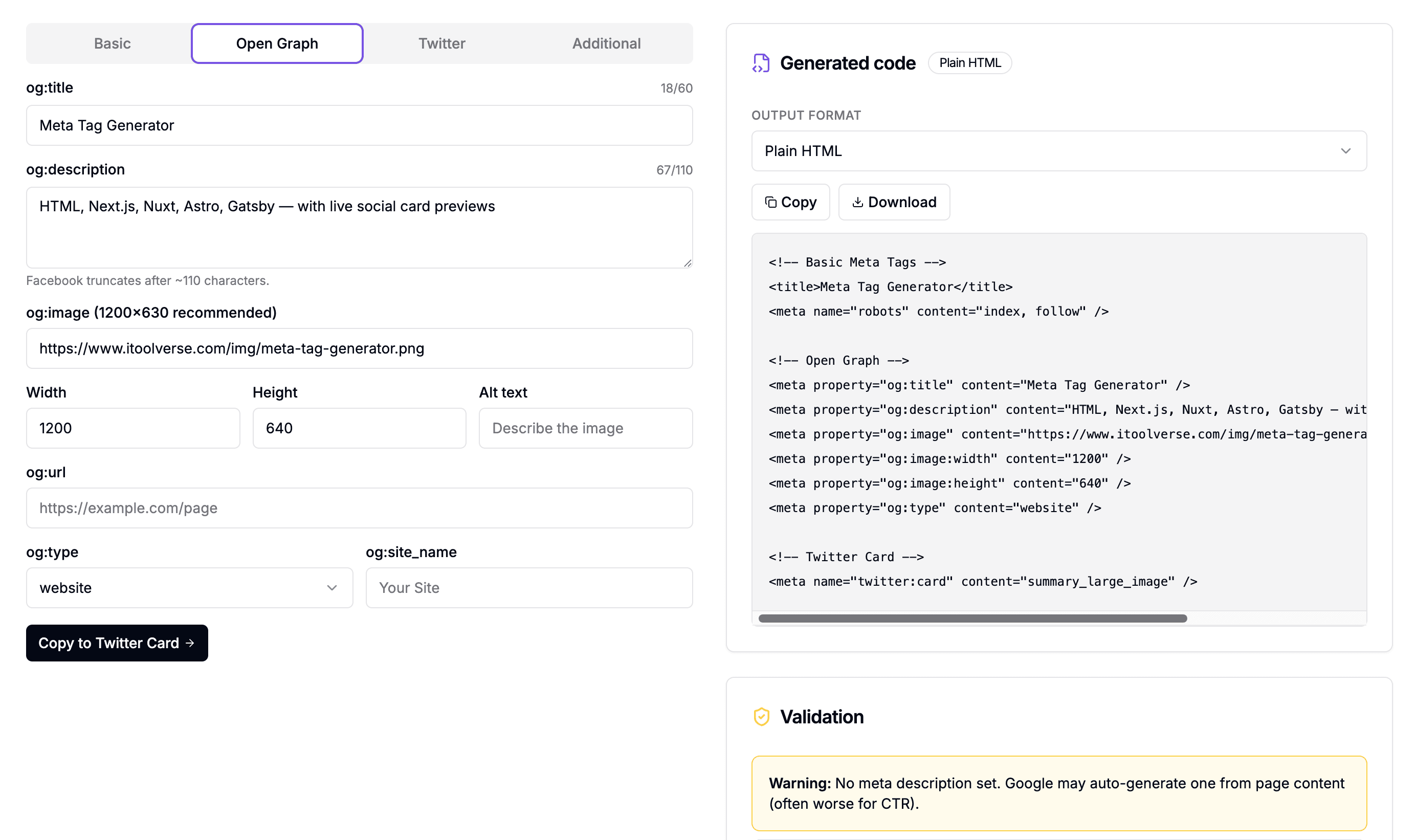
Writing the markup by hand for every page is fine for one site. For five clients and fifty pages it is not. The free Meta Tag Generator outputs the full set - title, description, canonical, Open Graph, and X Card - in one HTML block ready to paste into your <head>.
How to use it:
- Enter your page URL, title, and description. Character counters warn you before truncation.
- Upload or link a 1200 × 630 social image. The tool fills both
og:imageandtwitter:image. - Copy the generated block and paste it into your
<head>. Done.
It is free, requires no signup, and runs entirely in your browser.
Open the generator
Meta Tag Generator
Generate the full title / description / canonical / Open Graph / X Card block as HTML, Next.js, Nuxt, Astro, or Gatsby - with platform previews.