
JSON is the lingua franca of web APIs, but the spec is strict and the error messages are inconsistent across runtimes. This guide is the catalogue I wish I had the first time a production deploy failed because someone left a trailing comma in a templated payload. Paste any payload into JSON Beautify to validate and pretty-print it in your browser, no upload required.
What is JSON?
JSON (JavaScript Object Notation) is a language-independent, text-based data interchange format. The authoritative spec is RFC 8259 / STD 90, published December 2017 and edited by Tim Bray; it obsoletes RFC 7159 and is co-equal with ECMA-404 (2nd edition), which the two documents normatively reference each other. No successor has been published as of 2026, so when something claims to be “JSON” without further qualification, RFC 8259 is the contract.
It won because it is small, human-readable, and trivially mappable to the primitive types every modern language already has.
JSON syntax rules - the strict eight
RFC 8259 leaves no wiggle room. Memorise these:
- Strings use double quotes only.
'foo'is not valid JSON. - No trailing commas, in objects or arrays.
- No comments of any kind.
- No
undefined,NaN, orInfinityas values. - Allowed string escapes are exactly
\" \\ \/ \b \f \n \r \t \uXXXX. Anything else is a parse error. - Six value types:
string,number,boolean,null,object,array. - The root must be a JSON value (object, array, or primitive). RFC 8259 permits a primitive root, but many older parsers will reject it.
- Encoding is UTF-8 by default for interchange between systems.
Common JSON errors per runtime
This is the section the rest of the internet skips. Generic advice about “missing commas” does not help when you are staring at a specific SyntaxError and trying to grep your logs. Below is the per-runtime catalogue.
V8 (Chrome and Node.js)
V8 changed its phrasing around Node 21 / Chrome 119. Both forms are still in the wild because older Node releases linger in CI images.
JSON.parse("{");
// Modern: SyntaxError: Unexpected end of JSON input

JSON.parse("<html>");
// Modern: SyntaxError: Unexpected token '<', "<html>" is not valid JSON

JSON.parse("{a:1}");
// Legacy phrasing: SyntaxError: Unexpected token a in JSON at position 1

JSON.parse(undefined);
// Newer: SyntaxError: "undefined" is not valid JSON
// Older: SyntaxError: Unexpected token u in JSON at position 0
The position offset is byte-indexed from zero and points at the first character the parser could not consume, which is usually one position past the actual mistake.
SpiderMonkey (Firefox)
Firefox is the most helpful runtime here: it gives you a human line and column.
JSON.parse('[1, 2, 3,]');
// SyntaxError: JSON.parse: unexpected character at line 1 column 14 of the JSON data

JSON.parse("{'name': 'Ada'}");
// SyntaxError: JSON.parse: expected property name or '}' at line 1 column 2 of the JSON data

JSON.parse('{"x": 1.}');
// SyntaxError: JSON.parse: unterminated fractional number at line 1 column 2 of the JSON data

JSON.parse('"\u00ZZ"');
// SyntaxError: JSON.parse: bad Unicode escape at line 1 column N of the JSON data
JavaScriptCore (Safari)
JSC is terser and the phrasing is distinctive - useful when you are triaging error reports from real users.
JSON.parse("{");
// SyntaxError: JSON Parse error: Unexpected EOF

JSON.parse("{a:1}");
// SyntaxError: JSON Parse error: Unrecognized token '...'
Python json
import json
json.loads("")
# json.decoder.JSONDecodeError: Expecting value: line 1 column 1 (char 0)

json.loads('{"a": 1\n "b": 2}')
# json.decoder.JSONDecodeError: Expecting ',' delimiter: line 2 column 5 (char 14)

json.loads("{'a': 1}")
# json.decoder.JSONDecodeError: Expecting property name enclosed in double quotes: line 1 column 2 (char 1)
The most common Python case in the wild is Expecting value: line 1 column 1 (char 0), which almost always means the body you tried to parse is empty or is HTML - see the next section.
Spotting these by eye is painful in payloads larger than a screen. Paste the broken JSON into JSON Beautify and the parser will point at the offending line.
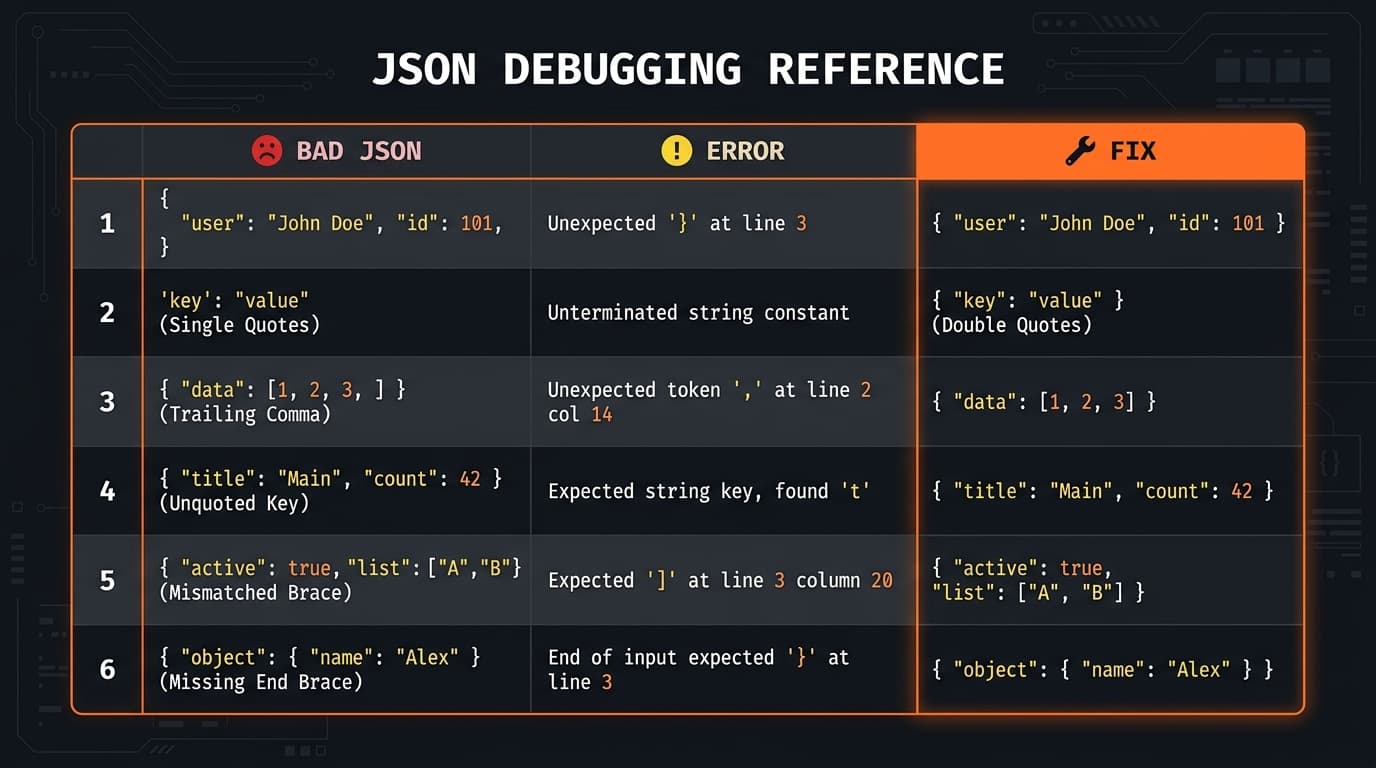
Debugging broken JSON
Walkthrough 1: Trailing comma from a templated payload
You generated this from a Jinja or Handlebars loop and forgot the last-item guard:
{ "items": [1, 2, 3,] }V8 says Unexpected token ']'. Firefox tells you line 1 column 19. The fix is one character - delete the comma - but the real fix is to switch to JSON.stringify(arr) server-side instead of building JSON with a string template. Any time you find yourself hand-templating JSON, you have a bug waiting to happen.
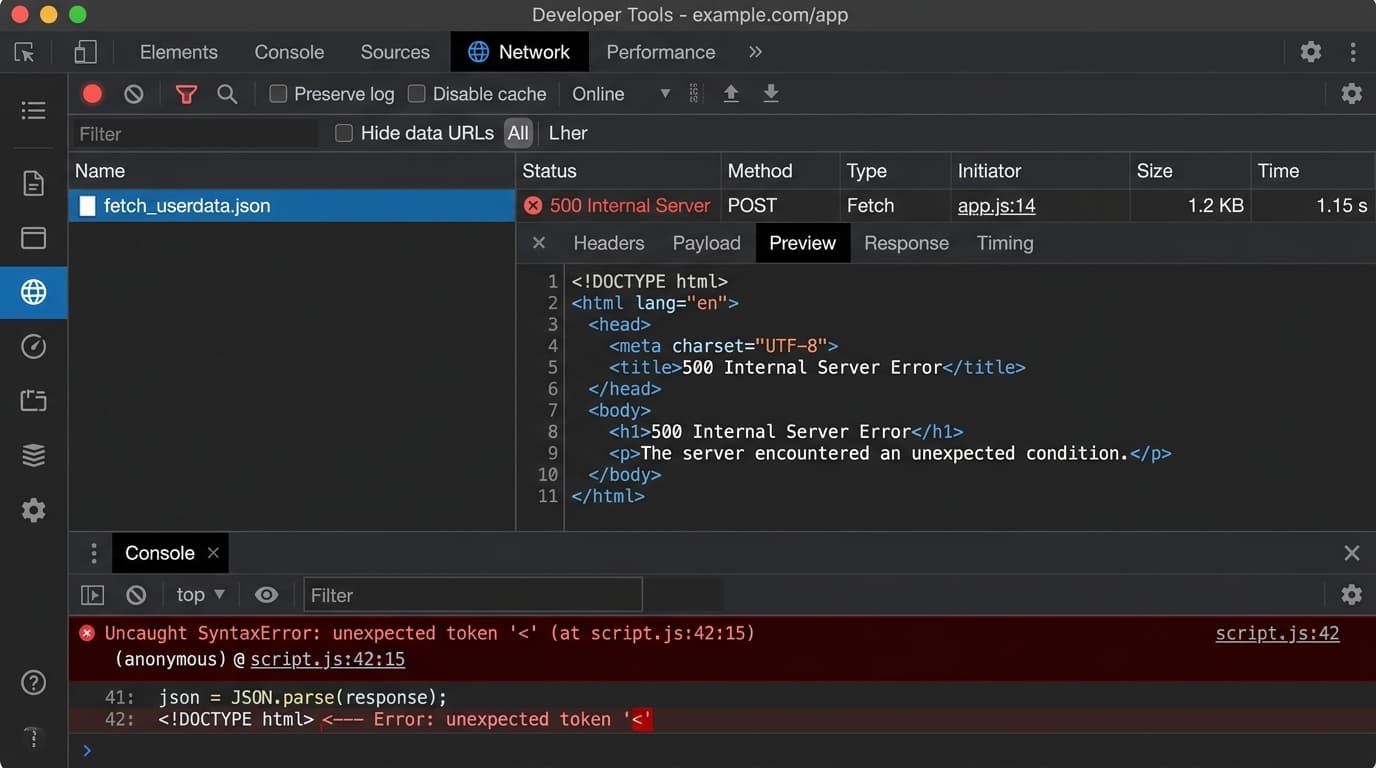
Walkthrough 2: Unexpected token '<' from a 500 HTML page
This is the single most common production JSON error and it is almost never a JSON problem. You wrote:
const res = await fetch('/api/orders');
const data = await res.json();
// SyntaxError: Unexpected token '<', "<!DOCTYPE "... is not valid JSON
The server returned an HTML error page (Cloudflare 5xx, a login redirect, a nginx 502) and your client tried to parse <!DOCTYPE html> as JSON. The < is byte 0, which is why V8 reports position 0. Fix the observability first:
const res = await fetch('/api/orders');
if (!res.ok) {
  const body = await res.text();
  console.error(
    'Non-OK response',
    res.status,
    res.headers.get('content-type'),
    body.slice(0, 200),
  );
  throw new Error(`API ${res.status}`);
}
const data = await res.json();
Once you read the body as text and log status and Content-Type, the actual failure (redirect to /login, Cloudflare error, expired token) is obvious. Then add Accept: application/json to the request so the server is forced to either honour it or return a structured error per RFC 7807 (application/problem+json).
Walkthrough 3: Silent BigInt corruption on a 64-bit ID
JSON.parse('{"id": 714341252076979033}');
// { id: 714341252076979072 }   <- last three digits silently changed
JavaScript numbers are IEEE-754 doubles. Number.MAX_SAFE_INTEGER = 9007199254740991 (that is 253 − 1). Any integer above this is rounded to the nearest representable double. Twitter-style snowflake IDs, Discord IDs, Stripe object IDs over a certain size, and bigint primary keys from Postgres all blow past this.
Three fixes, in increasing order of correctness:
- Server-side: serialise large IDs as strings. This is what Twitter, Stripe, and most modern APIs do.
"id": "714341252076979033". - Client-side fallback: use json-bigint and parse to BigInt.
- The future: TC39's
JSON.parsesource-text access proposal reached Stage 4 in November 2025 and is scheduled for ECMAScript 2026. It adds asourcefield to the reviver context so you can read the original digits and construct aBigIntlosslessly:
JSON.parse('{"id": 714341252076979033}', function (key, value, context) {
  if (key === 'id' && context && context.source) {
    return BigInt(context.source);
  }
  return value;
});
V8 ships it behind a flag; SpiderMonkey and JSC are tracking. Treat it as “rolling out across engines through 2026”, not universally available. For production today, prefer fix 1.
Inspect any payload
JSON Beautify
Validate, pretty-print, and minify JSON entirely in your browser - nothing is uploaded, so it's safe for payloads with tokens or PII.
How to validate JSON
Three paths I use, in order of how quickly I reach for them:
- Paste into JSON Beautify - instant validate, pretty-print, and minify, all client-side. The payload never leaves your browser, which matters when it contains tokens or PII.
JSON.parsein DevTools - paste the string into the console wrapped in quotes. Fastest when you are already in the browser.python -m json.tool < file.json- built into Python, no install, gives you line/column errors and pretty-prints to stdout.
Pretty print vs minified
Two-space indent is the de facto pretty-print standard ( JSON.stringify(value, null, 2)); tabs are fine if your team prefers. Minified means no whitespace at all (JSON.stringify(value)), which typically shaves 20 to 40 percent off payload size depending on key length and structure. Rule of thumb: production APIs minify and rely on gzip/Brotli to do the rest; local dev tools pretty-print so humans can read diffs.
JSON for APIs
A few non-negotiables:
- Always send
Content-Type: application/json; charset=utf-8. The charset is implied UTF-8, but some legacy proxies care. - Use HTTP status codes for transport-level signalling and a structured body for application-level errors. RFC 7807 Problem Details (
application/problem+json) is the standard envelope. - Request bodies should be idempotent under retry when the method is
PUTorDELETE. - For streaming or batch loads (logs, BigQuery, Snowflake, OpenAI batch files), use NDJSON instead of one giant array - see the table below.
JSON best practices
- Key order is not guaranteed. RFC 8259 says objects are unordered. Do not depend on it.
- Pick one case convention -
snake_caseorcamelCase- and stick to it across every endpoint. Mixed casing is a tax on every consumer. - Never embed secrets in JSON you log or cache.
- Version your schemas. Add a
versionfield or version your URL path. - Send IDs above 253 as strings. See the BigInt walkthrough above.
- Use ISO-8601 strings for dates (
2026-05-23T12:34:56Z), never Unix epoch numbers without a documented unit. - Validate at the boundary. Parse with a schema (Zod, Pydantic, JSON Schema) at every external trust boundary, then trust your typed objects internally.
JSON5 / JSONC / NDJSON - when to reach for them
| Variant | What it adds vs JSON | When to use | Common consumers |
|---|---|---|---|
| JSON (RFC 8259) | Baseline. Strict. | API wire format, config that must round-trip across languages | Everything |
| JSONC | // and /* */ comments only | Human-edited config | tsconfig.json, VS Code settings.json |
| JSON5 v1.0.0 | Comments, trailing commas, unquoted keys, single quotes, hex literals, Infinity/NaN | Human-authored config where ergonomics beat portability | Babel config, some build tools |
NDJSON / JSON Lines (.ndjson, .jsonl) | One JSON value per \n-terminated line | Log streams, batch uploads, line-oriented pipelines | BigQuery, Snowflake, OpenAI batch API, jq |
Free JSON Beautify tool
JSON Beautify validates, pretty-prints, and minifies JSON in your browser. The payload is never uploaded to a server, which matters when you are pasting a response that contains an auth token, a customer email, or a Stripe key. Related tools on iToolVerse: JSON to CSV, JSON to XML, and Base64 encoder/decoder.
Open the tool
JSON Beautify
Format, validate, and convert JSON in your browser - generate TypeScript / Go / Python / Rust / C# / Java / Kotlin types, plus JSON ↔ YAML conversion.