Yes. You can decode, encode, sign, and verify a JWT in plain browser JavaScript with zero npm packages, using nothing but TextEncoder/atob/btoa for the base64url work and the built-in crypto.subtle (Web Crypto) API for HMAC signing. The one catch that has to lead this article: doing this technically works anywhere, but signing or verifying with a secret client-side is only appropriate for debugging, demos, and local tooling. Decoding a token to read its claims for display is always safe. Using a client-side result to decide who gets access is not - the moment that decision matters, the secret and the verification step both belong on a server.
Everything below is copy-paste runnable and was executed on Node v24.13.0 on 18 September 2026, which exposes the same btoa, atob, TextEncoder, TextDecoder, and crypto.subtleglobals a browser does. If you'd rather see this happen without writing code, paste a token into the JWT Debugger - it runs the same decode, sign, and verify flow described here.
JWT anatomy in three pieces
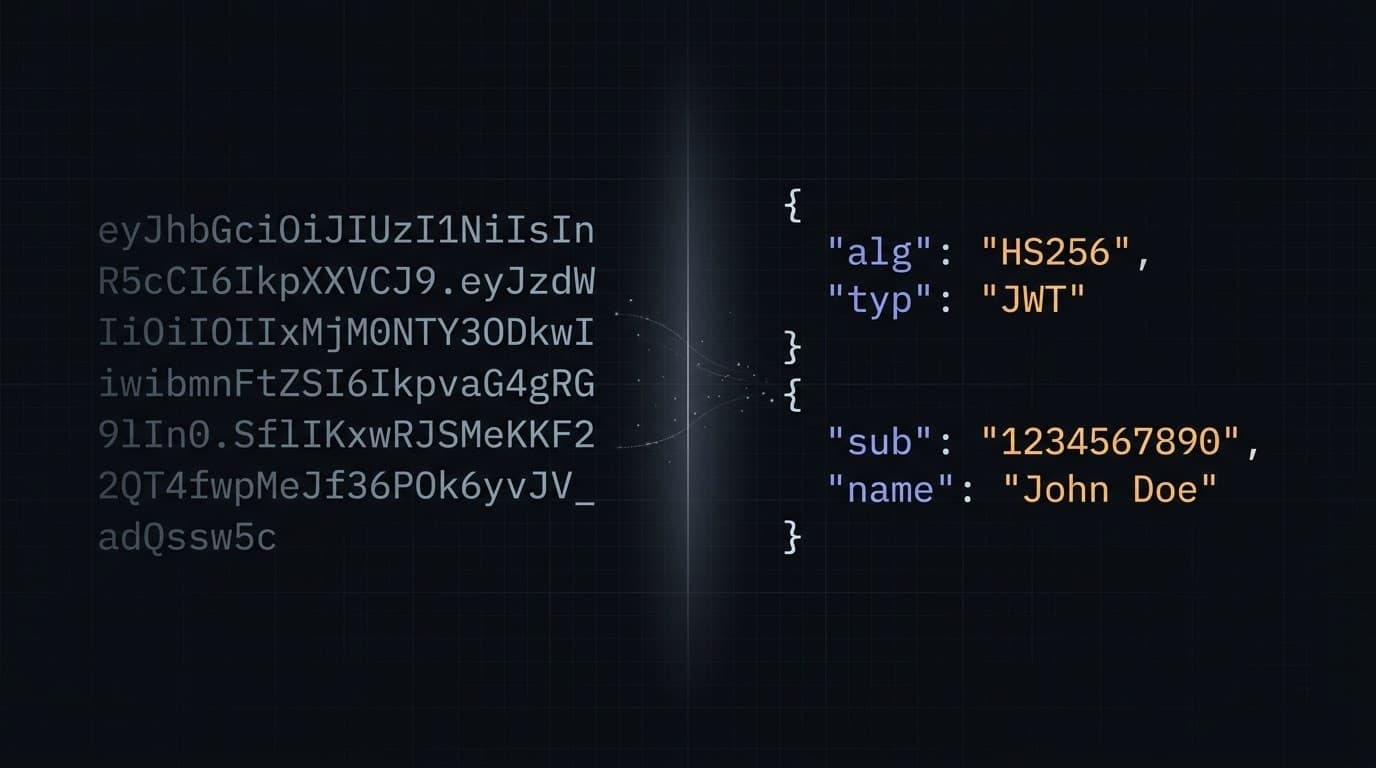
A JWT is three base64url segments joined by dots: header.payload.signature. Nothing about it is encrypted - it's encoded, not hidden.
eyJhbGciOiJIUzI1NiIsInR5cCI6IkpXVCJ9.eyJzdWIiOiIxMjM0NTY3ODkwIn0.SflKxwRJSMeKKF2QT4fwpMeJf36POk6yJV_adQssw5c
└───────────── header ─────────────┘ └──────── payload ────────┘ └─────────────── signature ───────────────┘
The header is a small JSON object naming the algorithm and token type ({"alg":"HS256","typ":"JWT"}). The payload is a JSON object of claims - whatever data the issuer put there, sub, exp, custom fields, none of it secret. The signatureis the output of running the header's algorithm over the first two segments plus a secret or private key; it detects tampering; it doesn't hide the content. Anyone can decode segments one and two with nothing more than atob. That's by design - a JWT is meant to be inspected, not concealed.
Base64url is not base64
The header and payload aren't standard base64 - they're base64url, and the difference matters the moment you hand-roll encoding yourself. Per RFC 7515 §2, base64url is “base64 encoding using the URL- and filename-safe character set... with all trailing '=' characters omitted... and without the inclusion of any line breaks, whitespace, or other additional characters.” Three differences from what btoa() gives you by default:
| Standard base64 | base64url (JWT) | |
|---|---|---|
| Character 62 | + | - |
| Character 63 | / | _ |
| Padding | = trailing chars | none - stripped entirely |
The swap exists because +, /, and = all carry special meaning in URLs and filenames - a token with unescaped + or / can get silently mangled by a proxy or query-string parser. Strip them out and a JWT is safe to drop straight into a URL, a header, or a filename with no escaping. You can see the padding half of this problem directly with our Base64 Encode and Base64 Decode tools - feed one a JWT segment with its =stripped and it won't round-trip until you restore the padding, which is exactly the math the helper below handles.
Wrapping that substitution and the Unicode fix (next section) into two reusable helpers gets you through the rest of this article:
function base64UrlEncode(input) {
  const bytes = typeof input === 'string' ? new TextEncoder().encode(input) : new Uint8Array(input);
  let binary = '';
  for (const byte of bytes) binary += String.fromCharCode(byte);
  return btoa(binary).replace(/\+/g, '-').replace(/\//g, '_').replace(/=+$/, '');
}

function base64UrlDecode(segment) {
  const base64 = segment.replace(/-/g, '+').replace(/_/g, '/');
  const padded = base64.padEnd(Math.ceil(base64.length / 4) * 4, '=');
  const binary = atob(padded);
  const bytes = Uint8Array.from(binary, char => char.charCodeAt(0));
  return new TextDecoder().decode(bytes);
}
base64UrlEncode accepts either a string or raw bytes (an ArrayBuffer), which is what lets it handle both JSON payloads and a raw HMAC signature later. base64UrlDecode reverses the substitution, pads the string back to a multiple of four characters, and runs it through TextDecoder instead of returning the raw atob output directly - that last step is the fix for a bug almost every other tutorial on this topic ships with.
Decoding a JWT without a library
Decoding is the easy direction: split on the dots, base64url-decode the first two segments, parse them as JSON.
function decodeJwt(token) {
  const parts = token.split('.');
  if (parts.length !== 3) throw new Error('Not a JWT: expected 3 dot-separated parts');
  const [headerB64, payloadB64, signature] = parts;
  return {
    header: JSON.parse(base64UrlDecode(headerB64)),
    payload: JSON.parse(base64UrlDecode(payloadB64)),
    signature,
  };
}
Run this against the canonical jwt.io sample token and you get header {"alg":"HS256","typ":"JWT"} and payload {"sub":"1234567890","name":"John Doe","iat":1516239022}- verified, not a guess. That token's secret is the literal string your-256-bit-secret, useful later for testing verify.

Decode a token now
JWT Debugger
Paste any token and see the header and payload decoded instantly, with expiry and issued-at timestamps rendered as readable dates.
The Unicode pitfall nobody warns you about
Here's where every btoa-based JWT tutorial, including most of the ones ranking for this exact query, gets it wrong. The common advice is “btoathrows on Unicode.” That's only half true, and the half they get wrong is the dangerous half.
Measured directly: btoa('{"name":"José"}') does not throw. It returns eyJuYW1lIjoiSm9z6SJ9- a token that looks completely valid. The problem is what's inside it. é is U+00E9, which sits inside the Latin-1 range, so btoa happily encodes it as the single byte 0xE9. Correct UTF-8 requires two bytes, 0xC3 0xA9. Compare the byte sequences directly:
btoa produced:   7b 22 6e 61 6d 65 22 3a 22 4a 6f 73 e9 22 7d
UTF-8 requires:  7b 22 6e 61 6d 65 22 3a 22 4a 6f 73 c3 a9 22 7d
^^^^^ one byte where two are neededOnly codepoints above 0xFF throw the error everyone quotes. btoa('{"emoji":"🔐"}') and btoa('{"city":"東京"}') both throw InvalidCharacterError: Invalid character- loud, caught in testing. It's the accented-Latin case that reaches production, because it looks like success. The decode side mirrors this: run atob() alone on a correctly UTF-8-encoded segment and you get mojibake, not an error.
The base64UrlEncode/base64UrlDecode pair above already fixes this by routing everything through TextEncoder/TextDecoder instead of feeding strings to btoa/atob directly. Confirm it yourself: base64UrlDecode(base64UrlEncode('{"name":"José Ñuñez","emoji":"🔐"}')) round-trips exactly, with no +, /, or = anywhere in the output.
Encoding a JWT from scratch
Encoding is the same operation run in reverse, minus the signature for now. Build the header and payload as plain objects, JSON.stringify each, run them through base64UrlEncode, and join with a dot:
const header = { alg: 'HS256', typ: 'JWT' };
const payload = { sub: '1234567890', name: 'José Ñuñez', iat: Math.floor(Date.now() / 1000) };

const unsignedToken = `${base64UrlEncode(JSON.stringify(header))}.${base64UrlEncode(JSON.stringify(payload))}`;
That's a syntactically valid two-part string, but not a usable JWT yet - anyone could edit either segment undetected. A JWT without a signature carries no integrity guarantee; signing is what turns it into something a verifier can trust.
Signing with Web Crypto (HMAC-SHA256)
This is the part most “no library” tutorials skip - it needs the Web Crypto API, not string manipulation. crypto.subtle handles HMAC natively, Baseline widely available since January 2020, with one requirement: it only works in a secure context, HTTPS or localhost.
async function signJwt(payload, secret, { alg = 'HS256', expiresInSeconds = 3600 } = {}) {
  const hash = { HS256: 'SHA-256', HS384: 'SHA-384', HS512: 'SHA-512' }[alg];
  if (!hash) throw new Error(`Unsupported algorithm: ${alg}`);

  const now = Math.floor(Date.now() / 1000);
  const body = { iat: now, exp: now + expiresInSeconds, ...payload };
  const header = { alg, typ: 'JWT' };

  const signingInput = `${base64UrlEncode(JSON.stringify(header))}.${base64UrlEncode(JSON.stringify(body))}`;

  const key = await crypto.subtle.importKey(
    'raw',
    new TextEncoder().encode(secret),
    { name: 'HMAC', hash },
    false,
    ['sign'],
  );

  const signature = await crypto.subtle.sign('HMAC', key, new TextEncoder().encode(signingInput));
  return `${signingInput}.${base64UrlEncode(signature)}`;
}
importKey turns your plain-string secret into a CryptoKey scoped to HMAC with the chosen hash; sign returns the raw signature as an ArrayBuffer, which base64UrlEncode accepts directly - no manual byte-array juggling. Verified output: the resulting token decodes back to {"alg":"HS256","typ":"JWT"} plus a payload carrying iat, exp, and your supplied claims, with the Unicode name intact. Swapping alg to HS512 works the same way - confirmed, not assumed.
Want a second opinion on your HMAC output? Run the same secret and signing input through the Hash Calculator - it supports HMAC alongside plain hashing, useful while debugging a mismatch.
Verifying a signature client-side
Verification runs the same key-derivation step, then hands the signature to crypto.subtle.verify instead of comparing strings yourself:
async function verifyJwt(token, secret) {
  const [headerB64, payloadB64, signatureB64] = token.split('.');
  const { alg } = JSON.parse(base64UrlDecode(headerB64));

  const hash = { HS256: 'SHA-256', HS384: 'SHA-384', HS512: 'SHA-512' }[alg];
  if (!hash) throw new Error(`Refusing to verify unexpected alg: ${alg}`);

  const key = await crypto.subtle.importKey(
    'raw',
    new TextEncoder().encode(secret),
    { name: 'HMAC', hash },
    false,
    ['verify'],
  );

  const base64 = signatureB64.replace(/-/g, '+').replace(/_/g, '/');
  const signature = Uint8Array.from(
    atob(base64.padEnd(Math.ceil(base64.length / 4) * 4, '=')),
    char => char.charCodeAt(0),
  );

  return crypto.subtle.verify('HMAC', key, signature, new TextEncoder().encode(`${headerB64}.${payloadB64}`));
}
Verified against the jwt.io sample token and its known secret: true with the correct secret, false with a wrong one.
Two details matter more than they look. First, the hashlookup table isn't decoration - it's the fix for algorithm-confusion attacks (more below), since the header's alg is never fed straight into a crypto call. Second, this uses crypto.subtle.verify rather than re-signing and comparing two signatures with ===, which is exactly what a widely-copied tutorial on this topic does. A plain === comparison can return as soon as the first mismatched byte is found, leaking timing information an attacker can use to guess a signature byte by byte - crypto.subtle.verifyis the safer default, though MDN's own docs don't explicitly promise constant-time behavior either, so treat it as “not obviously worse,” not a certified primitive. Which is the bigger point below: a client-side true or false was never a trust boundary.
The security section you can't skip
Everything above is real, working code. None of it changes this: a secret used to sign or verify a JWT cannot live in browser JavaScript if that token guards anything that matters. Browser JS is not a vault. Every string in it - including a secret passed to signJwt or verifyJwt - ships to the client and is readable by anyone with dev tools open. If a session, an API call, or an admin panel depends on that secret staying secret, putting it in client-side code is the same as not having a secret at all.

Four things to hold onto:
- Decoding for display is always fine.Showing a username or an expiry countdown from a token's claims involves no secret and no trust decision -
decodeJwtis safe to run on any token, anywhere, always. - A client-side
truefromverifyJwtis not a security boundary. Anyone can open dev tools and patch the function to always returntrue, or skip calling it. A verification result only means something when it runs somewhere the user can't tamper with - a server. exp,nbf, andiatare inert data until something enforces them. They're just numbers in a JSON object. Nothing about decoding checks whetherexphas passed; that's your responsibility, and it only matters on the side that controls the protected resource.- Never let the token pick its own algorithm. This is the algorithm-confusion attack: an attacker edits the header to
{"alg":"none"}or swaps in an unexpected algorithm, hoping your verifier trusts the header instead of a hardcoded expectation. Thehashlookup table inverifyJwtis the defense - it accepts only three algorithm names and throws on everything else, includingnone.
The practical rule: use everything in this article for debugging, local tooling, prototyping auth flows, or a JWT inspector - anywhere the token's owner and the person reading it are the same person, on the same machine. The moment a JWT decides what a different party is allowed to do, move signing and verification server-side and treat the browser as read-only.
When you should just use a library
Hand-rolling gets you a real, zero-dependency implementation - but you own every edge case forever: algorithm confusion, clock skew, key rotation, non-HMAC algorithms. Worth it for tooling and learning; for anything shipping to real users at scale, a maintained library removes that burden.
jose is the right pick for JWT handling that runs in the browser - it supports RS256, ES256, EdDSA, and more, with no Node-only dependencies. jsonwebtoken, the most commonly recommended JWT package in tutorials, does not run in the browser at all; it depends on Node's built-in crypto module. Recommending it for client-side use, which plenty of blog posts still do, is simply wrong.
Hand-rolled vs jose vs jsonwebtoken
| Hand-rolled (this article) | jose | jsonwebtoken | |
|---|---|---|---|
| Runs in the browser | Yes | Yes | No - Node-only |
| Bundle cost | Zero (native APIs) | Small, tree-shakeable | N/A in browser |
| Algorithms | HS256/384/512 as shown; extendable | HS, RS, ES, EdDSA, more | HS, RS, ES (server only) |
| Maintenance burden | On you - edge cases, updates | Actively maintained | Actively maintained |
| Good fit | Debugging, learning, no-dependency tooling | Browser or Node apps needing real algorithm coverage | Node-only servers issuing tokens |
If you want this behavior without writing or maintaining any of the code above, the JWT Debugger is the no-code equivalent - it decodes any token instantly, and signs and verifies HS256, HS384, and HS512 entirely in your browser, with no server round-trip and no secret ever leaving your machine. RS256 and ES256 decode fine there too, just not sign or verify, since those need asymmetric key pairs rather than a shared secret.
One last connection: the payload you're decoding or building is just JSON. For a large or deeply nested claims object, our JSON formatter guide covers formatting and validating it once JSON.parse hands it back to you.
Skip the boilerplate
JWT Debugger
Decode, sign, and verify HS256, HS384, and HS512 tokens entirely in your browser - no server round-trip, no account, no secret leaving your machine.